The file went live, but the screen still failed
The first warning often arrives as a phone photo. A store manager, a media buyer, or a local technician sends a picture of a screen that looks wrong. It is dim. It is frozen. It has gone black. Somewhere else, the campaign calendar says everything is fine.
That contradiction is the hidden cost of treating a digital signage CMS as if it were a maintenance team.
A CMS can confirm that the right creative was uploaded and scheduled. It can help a marketing team push a promotion across dozens or hundreds of screens. It cannot, by itself, prove that the panel is healthy, the cabinet temperature is stable, the brightness is holding, or the unit is ready for another month outdoors.
For indoor screens in easy-to-reach locations, that gap may only be annoying. For outdoor displays, retail window screens, smart-city kiosks, and DOOH networks, it becomes a commercial risk.
A CMS solves the content problem
A digital signage CMS gives teams a central place to upload creative, schedule playlists, assign screens to groups, localize campaigns, and control who can publish. That is valuable work. Without it, a screen network becomes a mess of manual updates and last-minute file chasing.
The growth of cloud-based signage tools makes sense for exactly that reason. More screens, more locations, and faster campaign cycles all push operators toward centralized content workflows.
But a CMS is still the content layer. It answers questions about what plays, when it plays, and where it plays. Those are not the same questions a service team asks when the screen starts behaving badly in the field.
Device management solves the field problem
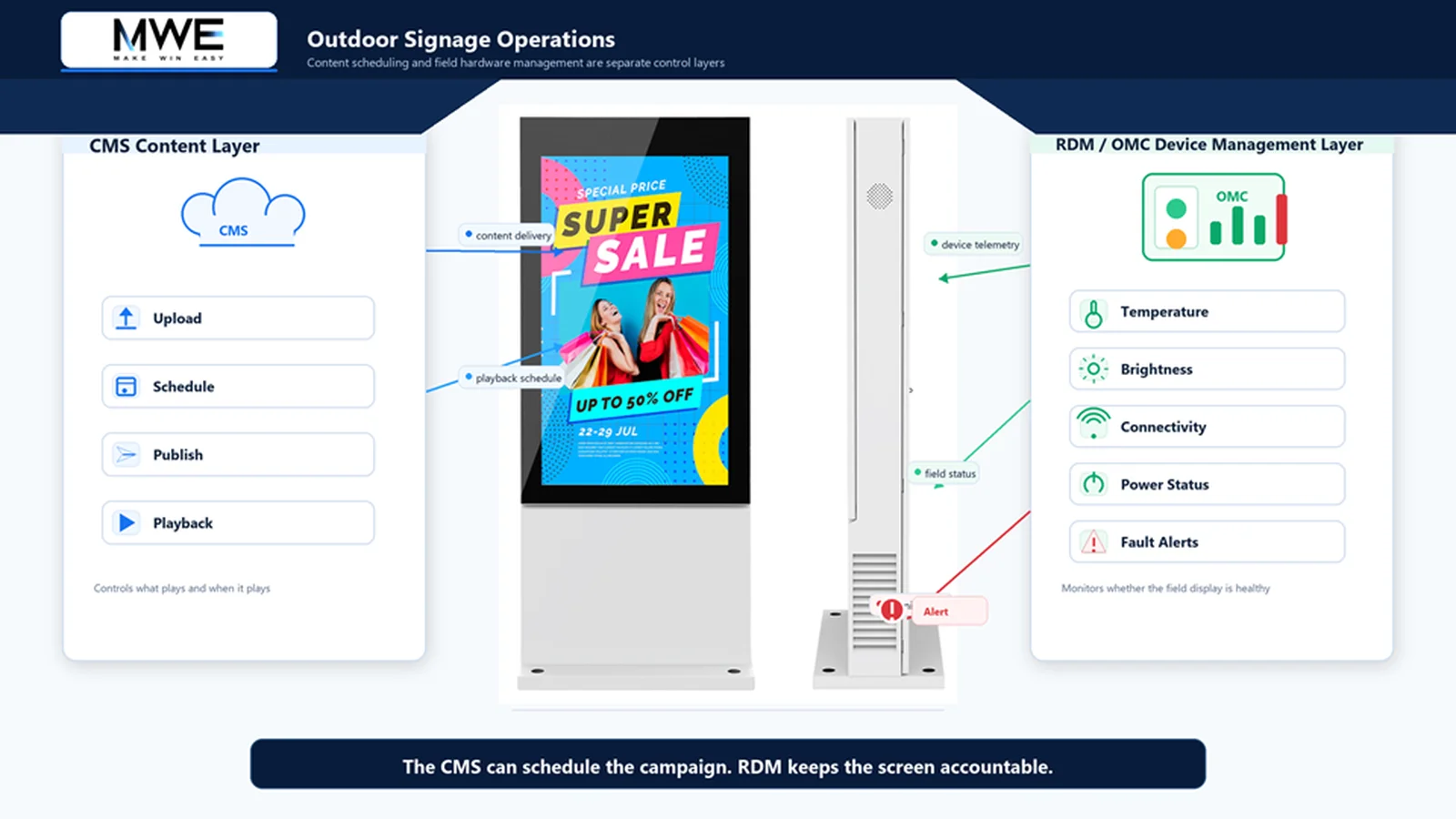
Remote device management treats the display as a working asset, not just a place where content appears. In a MWE Display network, the CMS can handle upload, scheduling, and playback, while RDM/OMC gives the operations team a clearer view of screen status, alerts, and service conditions across commercial display hardware.
That separation matters once a network scales. A content team may need to know whether a campaign launched. An operations team needs to know whether the screen can keep showing that campaign tomorrow.
Status monitoring, abnormal alerts, remote diagnosis, and maintenance coordination do not make field service disappear. They make service less blind. A technician can arrive with better context. A support team can catch repeated warnings before they become a visible failure. A buyer can separate a content issue from a hardware issue before the blame game starts.
Buying questions that separate the two
A practical procurement conversation has two tracks.
For the CMS, ask how playlists are scheduled, how approvals work, how screens are grouped, how quickly a campaign can be changed, and whether local teams can use the interface without calling the vendor every week.
For remote device management, ask what the hardware can report. Temperature, brightness behavior, connectivity, abnormal status, power events, and repeated warnings all matter more than a pretty dashboard screenshot. Ask who receives alerts. Ask what happens after an alert. Ask how the service process changes when there are hundreds of screens instead of ten.
If every answer comes back to content scheduling, the operations layer is still missing.
What this changes for outdoor networks
For MWE Display buyers, the better question comes after the spec sheet: how will the screen be monitored once it is installed? If a display will run outdoors, across multiple locations, or for long daily hours, the purchase decision includes service visibility, remote diagnosis, and the speed at which a support team can understand what is happening on site.
The buyer takeaway is simple. Use the CMS to run the message. Use remote device management to keep the physical network accountable.
A screen network is not successful because the file was sent. It is successful because the screen keeps earning its place in the field.
FAQ
What is the difference between a digital signage CMS and remote device management?
A digital signage CMS manages content upload, scheduling, publishing, and playback. Remote device management monitors the operating condition of display hardware, including status, alerts, and service-related conditions.
Why does this distinction matter for outdoor displays?
Outdoor displays face heat, weather, brightness drift, connectivity problems, and harder service access. Content delivery does not prove that the physical display is healthy.
What changes when the screen becomes an operating asset?
When a project uses MWE Display hardware, treat the screen as a managed asset after installation. That means looking beyond LCD digital signage, outdoor high-brightness LCD products, LED poster products, and related display systems as product categories, and asking how those devices will be monitored, serviced, and kept visible in daily operation.
When does a buyer need both CMS and RDM?
A buyer usually needs both when the network is multi-location, outdoor, high-brightness, tied to paid campaigns, or expensive to service manually.