A full-body 3D scanner can look convincing in a thirty-second demonstration. A subject steps into position, the cameras fire, and a polished model appears on screen. That moment matters, but it is not the buying decision.
For an event operator, the real product is the complete journey: guest preparation, capture, processing, review, correction, delivery, and support when something goes wrong. A useful demonstration recreates that journey with the people, time pressure, network conditions, and output requirements you actually expect.
What a full-body 3D scanner actually delivers
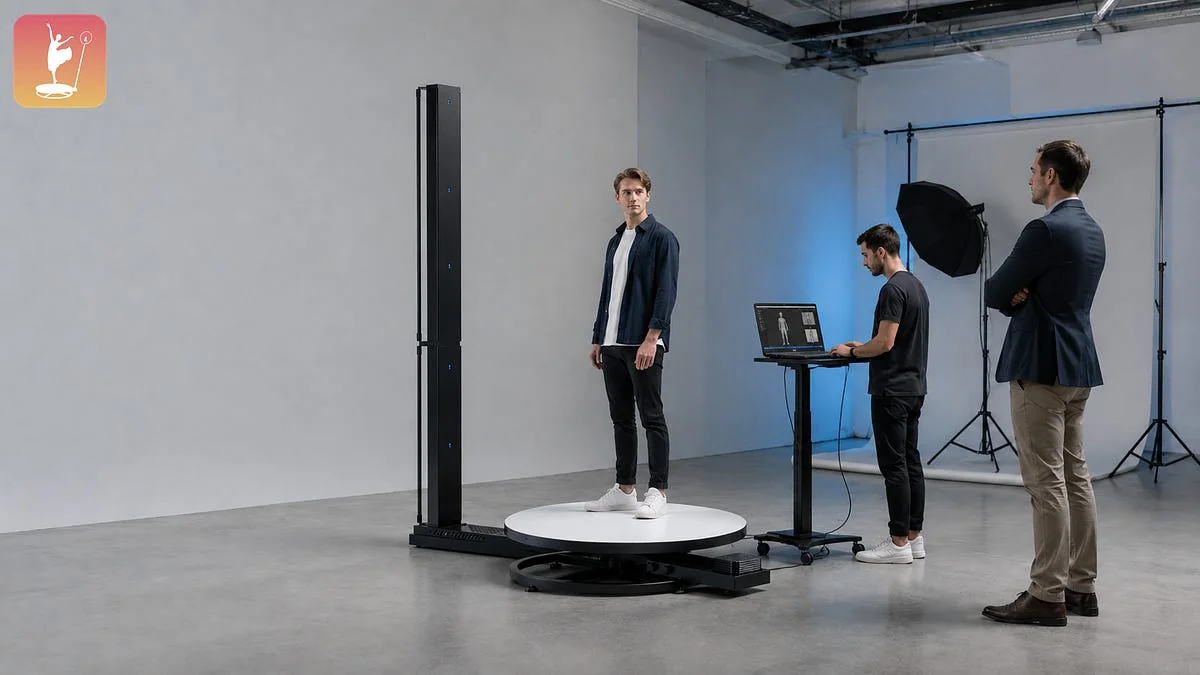
A full-body 3D scanner is a multi-camera capture system that records a person from several angles at nearly the same moment. Software then processes those images into a digital 3D representation. Depending on the commercial workflow, that representation may be reviewed on site, sent for later processing, or prepared for a downstream digital or physical product.
That definition exposes the first purchasing trap. The scanner is only one link in the chain. If your offer is a shareable digital character, a printable figure, or an on-site preview, each promise creates a different requirement for processing time, file format, quality review, storage, fulfillment, and guest communication.
Define the product you expect to deliver
Before the demonstration starts, write one sentence describing what the paying customer receives and when. “A scan” is too vague. “A reviewed digital model delivered after the event” is testable. So is “an on-site preview followed by a production-ready file.”
Ask the supplier to map that promise across the complete workflow: what happens at the venue, what happens in the cloud or a separate workstation, what requires a trained operator, and what happens after the guest leaves. If a third party performs modeling, cleanup, printing, or fulfillment, identify that dependency now.
-
What is created immediately after capture?
-
What can the guest or operator inspect on site?
-
Which steps require an internet connection or external processing?
-
What file is delivered, and which downstream tools accept it?
-
Who owns quality control when the first result is not usable?
Watch one complete capture, not a prepared result
Ask to begin with an unscanned person and an empty job. Time the workflow from guest instruction to a result that is ready for its next destination. Watch where the operator types, waits, repositions the subject, or switches tools.
Do not treat processing time as a single number. Separate active staff time from unattended processing. Five minutes of background processing may be manageable; five minutes of operator attention for every guest may determine the capacity of the whole activation.
The current ChackTok Full Body 3D Scanner product page presents a six-camera system with ChackTok 3D software and cloud processing. Those listed elements give buyers a starting point for the demonstration, but the live test still needs to establish how the current configuration behaves in the planned venue and delivery workflow.
Test realistic guests and clothing
Prepared demonstrations usually use a cooperative subject in scanner-friendly clothing. Events do not. Bring two or three test subjects who represent the people you expect: different heights, hair shapes, footwear, and clothing textures. Ask the operator which materials, poses, accessories, or movements are most likely to create gaps or artifacts.
This is not a search for perfection. It is a search for an operating rule. You need to know what staff must tell a guest before capture, when a rescan is worthwhile, and when the expected output cannot be delivered reliably.
-
Test a normal event outfit, not only a fitted studio outfit.
-
Observe how long guest positioning and instruction take.
-
Compare the first result with a rescan after corrected posture or clothing.
-
Record any restrictions that need to appear in sales copy or pre-event instructions.
Inspect the operator recovery path
A smooth scan proves the happy path. A buying demonstration also needs one controlled failure. Ask the operator to interrupt a job, lose a camera connection, or cancel processing at a safe point, then recover without losing unrelated work.
Watch how the system identifies the problem. Is the error specific enough for event staff to act on? Can a job be resumed or must it begin again? Which recovery steps can frontline staff perform, and which ones require remote support? A recovery path that is clear in a quiet showroom is much easier to defend in a crowded venue.
Confirm processing, files, and handoff
File questions belong in the demonstration, not in a later email. Ask for a sample output from the exact workflow you have just watched. Open it in the downstream application or production service you plan to use. Confirm scale, texture, naming, orientation, file size, and transfer method.
Industry formats such as 3MF can carry structured 3D manufacturing data, but the existence of a standard does not prove that a particular scanner exports it. Ask which formats the current ChackTok workflow produces, which require conversion, and whether the recipient has validated them.
Cloud processing also creates operating questions. Measure the upload required for one capture, test the venue connection if possible, and define what staff do when a job remains pending. Never infer an offline mode, storage period, or service level without current product documentation.
Leave with a written demo record
A useful demonstration ends with evidence that colleagues can review. Save the configuration tested, software version, output sample, measured timings, unresolved questions, and the person responsible for each answer. Add any assumption about venue space, power, network, staffing, or downstream fulfillment.
ChackTok has approved commercial-use experience in five markets—Spain, the United States, Cyprus, Australia, and Mexico—but local experience is not a substitute for testing your own offer. Confirm the current demonstration location, product status, delivery path, and support arrangement before making a commitment.
The best demo does not remove every risk. It turns hidden dependencies into a practical launch plan. If the complete guest-to-output journey survives your own subjects, your own file destination, and one controlled failure, you have a much stronger basis for comparing the system with the alternative.
FAQ
What should I bring to a full-body 3D scanner demonstration?
Bring two or three representative test subjects, a written description of the customer deliverable, the downstream software or fulfillment requirements, and a timer. If possible, bring a laptop that can open or validate the expected output file.
How long should a full-body 3D scan take?
There is no useful universal number. Measure guest instruction, positioning, capture, active operator work, processing, review, and recovery separately. Capacity depends on the slowest repeatable step in your exact workflow.
Which file format is best for a 3D body scan?
The best format is the one accepted by the next tool or production service without losing required geometry, texture, scale, or metadata. Confirm the scanner’s current outputs and test a real sample; do not infer support from an industry format list.
Can a showroom demo predict event performance?
Only partly. It can prove the workflow and expose dependencies, but venue network quality, lighting, crowd flow, staffing, and guest behavior still need a site-specific test or launch plan.
What is the most important buying question?
Ask who owns the result when the first capture is unusable. The answer reveals the recovery process, staffing burden, support boundary, and likely effect on the guest promise.